Checkout gateway
Checkout gateway for Indian ecommerce
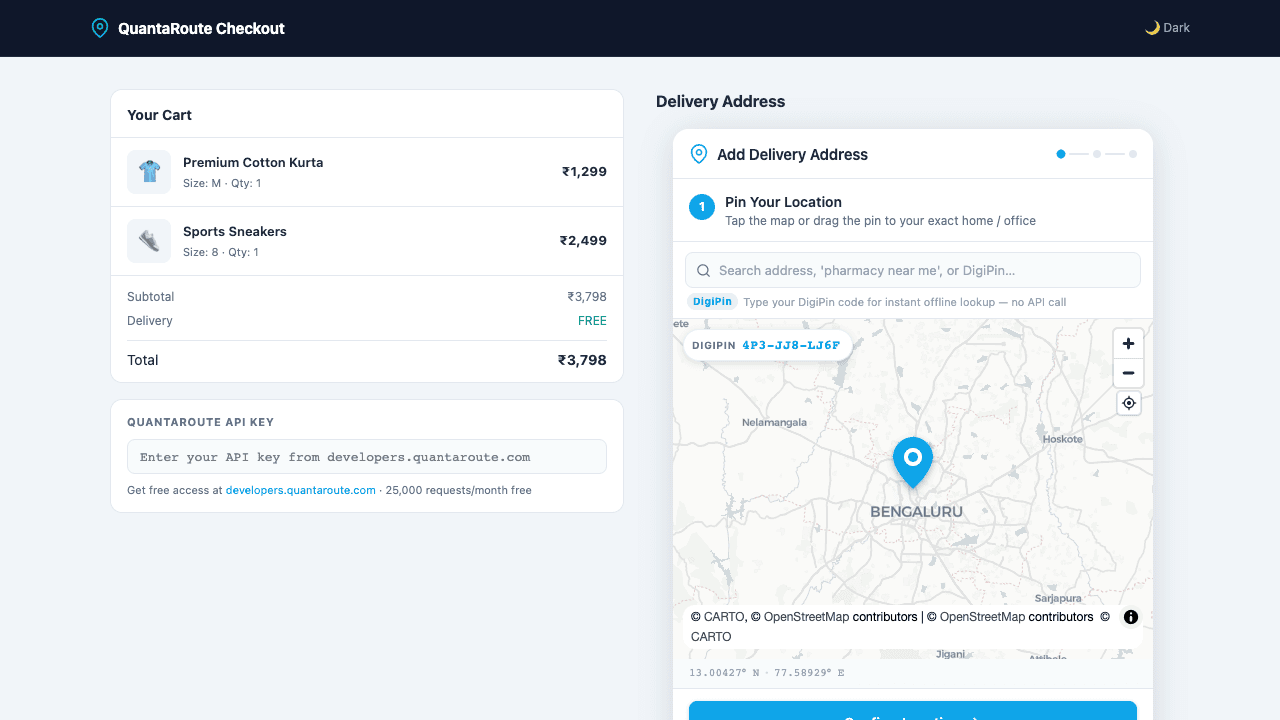
QuantaRoute Checkout is an address-first checkout for Indian stores. Buyers drop a pin, receive a DigiPin for that 4m × 4m cell, and their pincode and locality fill in before payment. Your existing gateway still takes the money.
How address-first checkout works
01
Pin the building
The buyer drops a pin on a live map, or searches an address or DigiPin. The widget encodes that point with India Post’s official DigiPin algorithm (~4m × 4m cells).
02
Fill what the map can see
State, district, locality and pincode come from 19,000+ India Post pincode boundaries and 154,000+ post offices. The buyer types only the flat, floor and building.
03
Hand off payment
Mode A sends the buyer to PayU, Cashfree, Paytm or Shopify checkout. Mode B collects inside the widget on your Razorpay keys. Settlement stays with you — QuantaRoute never holds customer funds.
DigiPin follows India Post’s DigiPin technical document and the official open-source implementation. Pincode lookup uses India Post boundary data, not a guessed pin from the typed street line.
Address capture, not a replacement payment gateway
Payment checkouts collect the card or UPI. QuantaRoute Checkout collects a delivery point a courier can find, then hands off. Use both.
| Capability | Payment-only checkout | QuantaRoute Checkout |
|---|---|---|
| Map pin and DigiPin | Not typical. Address is typed, not pinned. | Yes. Pin, DigiPin, lat/lng on the session. |
| Pincode and locality | Buyer types them, or a payment SDK guesses. | Filled from 19,000+ India Post pincode boundaries. |
| Takes the payment | Yes. | No. Handoff to your PG, or BYO Razorpay in-widget. |
| Same key as maps and search | Separate stack. | Yes — public dp_ key. Secret qca_ key stays on the server. |
Payment modes, webhooks and props are in the payment docs.
Built for Indian storefronts, Shopify and ops
storefronts
D2C and custom storefronts
Drop the React widget (or a script tag) on your cart. One npm package for web; native packages for iOS and Android. The same public dp_ key you already use for Maps and search.
shopify
Shopify merchants
Connect the shop during merchant onboarding, then add the QuantaRoute cart block in the theme. The widget captures the pin and DigiPin; Shopify or your connected gateway still takes payment.
ops
Logistics and operations
Every order stores a DigiPin plus lat/lng and an India Post pincode — the same government pincode layer as the rest of QuantaRoute. Use it in your WMS or courier handoff; we do not claim a return-to-origin rate.
One widget, four ways to ship it
React and Next.js
Install @quantaroute/checkout, pass your public dp_ key, and handle onComplete with the DigiPin, pincode and formatted address.
Widget docsiOS and Android
The same two-step flow in native apps. Add the app’s package name or bundle id to the key, as you do for Maps.
Mobile setupShopify
Merchant onboarding links the store. After that, enable the cart block from the Shopify admin — not from this portal.
Merchant setupOther storefronts
A CDN script tag mounts the widget on a checkout button. Payment still goes to the gateway you already run.
Script-tag install
The public widget key is a dp_ key with maps and geocoding scopes — the same key as Maps of India, search and routing. Checkout also issues a qca_ admin key for server-side admin and webhooks. That secret never ships in the storefront.
npm install @quantaroute/checkout maplibre-glCheckout gateway FAQ
Straight answers for merchants and developers. Widget props, webhooks and DPDP notes live in the docs.
What is the QuantaRoute checkout gateway?
QuantaRoute Checkout is an address-first checkout for Indian stores. Buyers drop a pin on a live map, receive a DigiPin for that ~4m × 4m cell, and their state, district, locality and pincode fill in before payment. Payment either hands off to your existing gateway (PayU, Cashfree, Paytm or Shopify checkout) or runs in the widget on your own Razorpay account. QuantaRoute never holds customer funds. It works with React web, iOS, Android and Shopify.
How does map-pin address capture work at Indian checkout?
The buyer pins their building on the map (or searches an address / DigiPin). QuantaRoute encodes that point with India Post's official DigiPin algorithm (see the India Post DigiPin technical document) and looks up locality and pincode against 19,000+ pincode boundaries and 154,000+ post offices. The buyer then types only the flat, floor and building — the parts a map cannot see.
Does QuantaRoute process the payment?
No. QuantaRoute captures the delivery address. Mode A sends the buyer to the payment gateway you already use. Mode B collects payment inside the widget using your Razorpay keys. Settlement always goes to your account; QuantaRoute is not a payment aggregator for this flow.
Can I use QuantaRoute Checkout on Shopify?
Yes. Shopify merchants connect the store during merchant onboarding, then add the QuantaRoute cart block in the theme. The widget captures the pin and DigiPin; Shopify or your connected gateway still takes payment. After setup, return to the Shopify admin to enable the block.
Does checkout use the same API key as Maps, search and routing?
Yes. The public widget key is a dp_ key with maps and geocoding scopes (routing is optional on the same key). Checkout also issues a separate secret admin key (qca_) for server-side admin and webhooks. That secret never ships in the storefront bundle.
How do I start with QuantaRoute Checkout?
Create a merchant account at developers.quantaroute.com/onboarding/merchant, copy the widget snippet, and npm install @quantaroute/checkout. A live demo is at quantaroute-checkout.vercel.app. Widget docs, payment modes, webhooks and the Checkout DPA are linked from the product page.
Put a pin on your checkout
Widget docs · Payment modes · Maps of India · FAQ · Pricing · Checkout DPA